Evaluating the 5x8 Journal Template for KDP Publishing
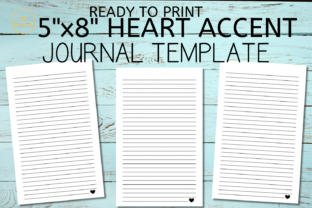
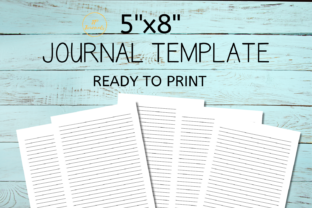
For self-publishers and digital product creators, the efficiency of asset creation often dictates profitability. The Journal Template in question addresses a specific bottleneck in the low-content publishing workflow: formatting consistency. This resource provides 110 blank lined pages formatted specifically for Amazon KDP’s 5x8 trim size with no bleed settings. Available as both a print-ready PDF and an editable MS Word document, it serves as a foundational utility rather than a creative end-product. Understanding its practical application requires looking beyond the page count to evaluate how it integrates into a professional publishing workflow.
Technical Specifications and Format Compliance
The primary value proposition of this journal template lies in its adherence to strict printing specifications. The 5x8 trim size is a versatile standard in the paperback market, offering a portable form factor that appeals to commuters, students, and professionals who find the standard 6x9 size too bulky for daily carry. However, 5x8 presents unique margin challenges. Because the physical surface area is smaller, safe zones and gutter margins must be calculated precisely to prevent text or lines from being trimmed during the binding process.
This template comes pre-configured with "No Bleed" parameters. In KDP terminology, this means all content stays within the safe zone, maintaining a white border around the entire page. For lined journals, this is generally the preferred specification unless the designer intends for the ruling to extend to the very edge of the paper. By locking these dimensions into the file structure, the template eliminates the most common cause of KDP rejection: margin errors. The inclusion of 110 pages is also strategic; it hits a sweet spot for spine width (allowing for legible spine text) while keeping page count costs manageable for competitive pricing.
Dual File Utility: PDF vs. MS Word
The provision of two distinct file formats significantly expands the template's usability across different skill levels and project scopes.
- Print-Ready PDF: This is the production master. For publishers who do not need to alter the interior layout, this file ensures that what is seen on screen is exactly what prints. It preserves font embedding, line spacing, and margin integrity without the risk of version incompatibility issues that can occur when moving Word documents between computers.
- MS Word Document: This serves as the customization layer. Experienced publishers know that differentiation is key in saturated markets. The Word doc allows users to add front matter, copyright pages, dedication sections, or specialized headers and footers without rebuilding the document from scratch. It also enables the modification of line spacing or ruling style if the target audience requires specific accommodations, such as wider spacing for handwriting practice or narrower ruling for dense note-taking.
Practical Application in Publishing Workflows
In real-world use, this journal template functions best as a time-saving baseline. Creating a properly formatted 110-page document with consistent gutters and mirrored margins takes considerable time, even for those proficient in typography. For a publisher managing multiple SKUs, this overhead compounds quickly. By utilizing a verified template, the focus shifts from technical setup to niche research and cover design, which are higher-leverage activities.
However, users should approach this asset with realistic expectations regarding customization. While the MS Word file is editable, extensive structural changes—such as converting single-column lines to double-column layouts or adding complex graphic elements—may require reformatting the master styles. It is most effective when the goal is a traditional lined journal or a notebook with minor textual additions. Publishers attempting to create highly interactive planners or guided journals may find the base template too rigid and would be better served by more complex layout tools like Adobe InDesign or Affinity Publisher.
Audience Fit and Use Cases
The versatility of a 5x8 lined format makes this template applicable to several distinct demographics within the 20–50 age range:
- Freelancers and Bloggers: These professionals often sell digital downloads or physical companions to their content. A branded 5x8 notebook serves as an excellent low-cost entry point for merchandise stores or lead magnets. The Word document allows for easy insertion of branding elements, website URLs, or social media handles on the first few pages.
- Educators and Tutors: Smaller trim sizes are ideal for student workbooks or vocabulary logs. The ability to edit the Word file means educators can add title pages, grading rubrics, or instructional text before printing batches for classroom use or selling on educational marketplaces.
- Small Business Owners: Corporate gifting and internal documentation often require simple, clean notebooks. This template provides a professional starting point for creating branded meeting notes or employee welcome kits without hiring a graphic designer.
- Serious Hobbyists: Writers, poets, and researchers frequently prefer the 5x8 size for field notes. Self-publishers targeting these niches can use this template to produce high-quality, minimalist notebooks that compete with traditional stationery brands on utility rather than gimmicks.
Quality Assessment and Limitations
When evaluating any third-party publishing asset, one must consider reliability and long-term value. This template scores well on technical compliance but requires user diligence regarding content differentiation. Amazon KDP has become increasingly stringent about duplicate content. Simply uploading this PDF with a new cover may eventually flag quality warnings if hundreds of other sellers have done the same.
To mitigate this risk and maximize the template's value, professionals should treat it as a skeleton rather than a finished body. Practical recommendations for ensuring quality include:
- Add Unique Front Matter: Always utilize the Word document to insert at least 2-4 pages of unique content. This could be a "How to Use This Journal" guide, a personalized introduction, or niche-specific prompts. This breaks the duplicate content fingerprint and adds genuine value for the buyer.
- Verify Margins Before Upload: Even with a pre-formatted template, always run the final PDF through KDP’s Previewer tool. Paper thickness calculations can change based on ink type (black & white vs. color) and paper stock (white vs. cream). A template set for white paper may need slight adjustments if switching to cream paper for a vintage aesthetic.
- Check Line Weight: Ensure the line opacity is appropriate for the intended writing instrument. Some templates use lines that are too dark, causing bleed-through or visual distraction. Test print a single page at actual size before committing to a full proof order.
- Metadata Alignment: The 5x8 size attracts buyers looking for portability. Ensure your book description and keywords accurately reflect this dimension. Misleading customers who expect a standard 6x9 notebook results in returns and negative reviews, regardless of interior quality.
Strategic Value for Content Creators
Ultimately, the decision to use this journal template should be based on workflow efficiency versus creative control. For creators who need a reliable, compliant interior for standard lined notebooks, it removes significant friction. The dual-format delivery respects both the "publish fast" mentality and the "customize deeply" approach, making it a flexible tool in a publisher's arsenal.
It is less suitable for those seeking to innovate on the interior experience itself. If your business model relies on unique layouts, proprietary tracking systems, or complex visual designs, this template is merely a reference point rather than a solution. However, for the vast majority of low-content publishing needs where the value lies in the cover design, niche targeting, and brand association, this 5x8 journal template provides a solid, professional foundation. It allows entrepreneurs and creators to bypass technical formatting hurdles and focus on building a sustainable catalog of products that serve specific audience needs.
By understanding both the capabilities and constraints of this asset, publishers can integrate it effectively into their production pipeline. It represents a pragmatic balance between automation and customization, supporting the scalable creation of quality print products while maintaining the flexibility required to stand out in a competitive marketplace.